



 Bingo
Bingo  live
live Casimpo Casino Payments
Casimpo Casino provides several payment options for funding your account and withdrawing winnings. All cashier transactions are handled through secure payment systems, and Casimpo uses encryption and protection technologies to help keep financial details safe.
To make a payment or request a withdrawal, you must first register, log in and complete any required account verification checks.
How to Make a Deposit
To deposit funds into your Casimpo Casino account:
- Log in to your account.
- Open the Cashier.
- Choose the Deposit option.
- Select your preferred payment method.
- Enter the amount and any required payment details.
- Add a deposit code if one applies.
- Confirm the transaction.
Once the payment is approved, funds are normally added to your casino balance instantly. You will also receive an email confirmation with transaction details.
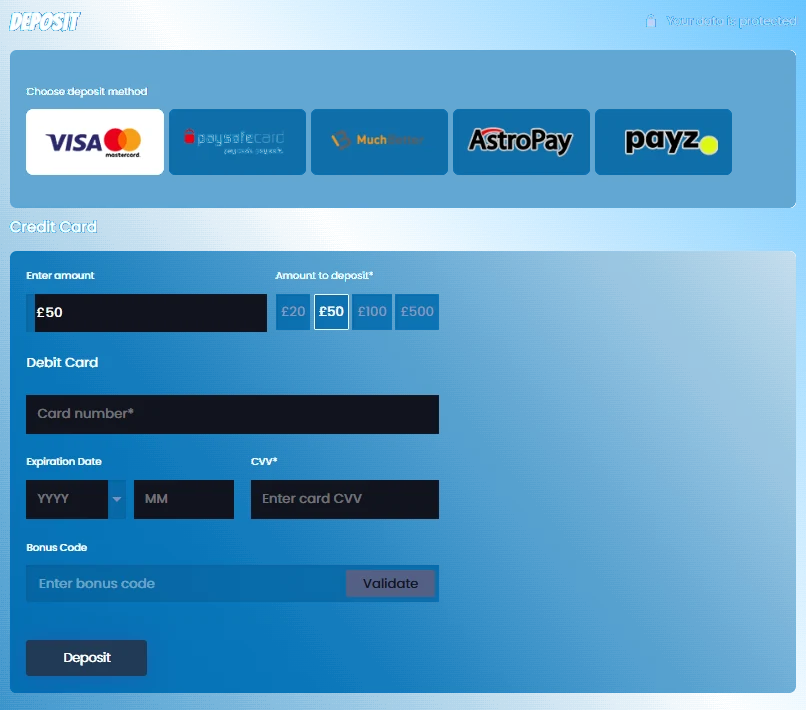
Deposit Methods
| Method | Minimum Deposit | Notes |
|---|---|---|
| Debit Cards | GBP 10 | Debit, virtual and prepaid cards may be accepted |
| PayPal | GBP 10 | |
| PayviaPhone | GBP 10 | Cannot be used for withdrawals, 15% processing fee applies |
| Apple Pay | GBP 10 | |
| Instant Bank Payments | GBP 20 | Direct online bank payment through supported banks |
| paysafecard | GBP 10 | |
| Payz | GBP 20 | Uses a Payz account ID |
| NETELLER | GBP 20 | bonuses excluded |
| Skrill | GBP 20 | bonuses excluded |
| NeoSurf | GBP 15 | Uses a NeoSurf voucher or MyNeoSurf wallet |
Debit Card
Casimpo Casino may accept Visa and Mastercard debit, virtual and prepaid cards. Credit cards cannot be used for gambling transactions in the UK and Ireland.
To deposit by card, choose the card option in the Cashier, enter your deposit amount and card details, then confirm the payment. If the bank approves the transaction, the funds are credited instantly.
A card payment may fail if the balance is too low, the entered details do not match the bank records, the CVV is incorrect or the issuing bank does not allow online gaming payments.
PayPal
PayPal can be used to top up your Casimpo Casino account where available. The source information states that PayPal is available for customers from the UK and Ireland. Payments are encrypted and funds are normally available in your casino balance as soon as the transaction is completed.
Pay via Phone
PayviaPhone allows eligible UK players to deposit through their mobile phone provider. The source information states that the minimum deposit is GBP 10, PayviaPhone cannot receive withdrawals, and a 15% processing fee is deducted from deposits made with this method.
Apple Pay
Apple Pay can be used for quick card-based payments without entering full card details each time. To use it, add a card to your Apple device, select Apple Pay in the Cashier, enter the amount and confirm the transaction with Touch ID, passcode or another supported Apple verification method.
Instant Bank
Instant Bank Payments allow players to transfer money directly from a supported bank account. Select Online Bank Payments in the Cashier, choose your bank, review the payment details, log in through your bank and confirm the payment. After confirmation, you will be redirected back to the Cashier.
paysafecard
paysafecard is a prepaid payment method that lets players fund an account without sharing bank or card details with the casino cashier. The source information states a deposit range of GBP 10 to GBP 700.
Payz
Payz allows players to deposit through an online account. To use this method, open a Payz account, choose Payz in the Cashier and enter your Payz account ID. The source information states a minimum deposit of GBP 20.
NETELLER
NETELLER is an e-wallet payment method. Select NETELLER in the Cashier, enter the amount and confirm the deposit through NETELLER if required. The source information states a deposit range from GBP 20 to GBP 5000, and that NETELLER deposits are excluded from bonuses.
Skrill
Skrill is an e-wallet option for online transfers. Choose Skrill in the Cashier, enter your deposit amount and follow the Skrill confirmation steps. The source information states a deposit range from GBP 20 to GBP 5000, and that Skrill deposits are excluded from bonuses.
NeoSurf
NeoSurf is a prepaid voucher method. Choose NeoSurf in the Cashier, enter the amount and complete the payment with your voucher or MyNeoSurf wallet. The source information states a minimum deposit of GBP 15.
How to Withdraw Funds
To request a withdrawal from Casimpo Casino:
- Log in to your account.
- Open the Cashier.
- Choose the Withdrawal option.
- Select an available withdrawal method.
- Complete the form for that method.
- Confirm the withdrawal request.
You will receive an email notification once the request has been delivered and the funds have been transferred.
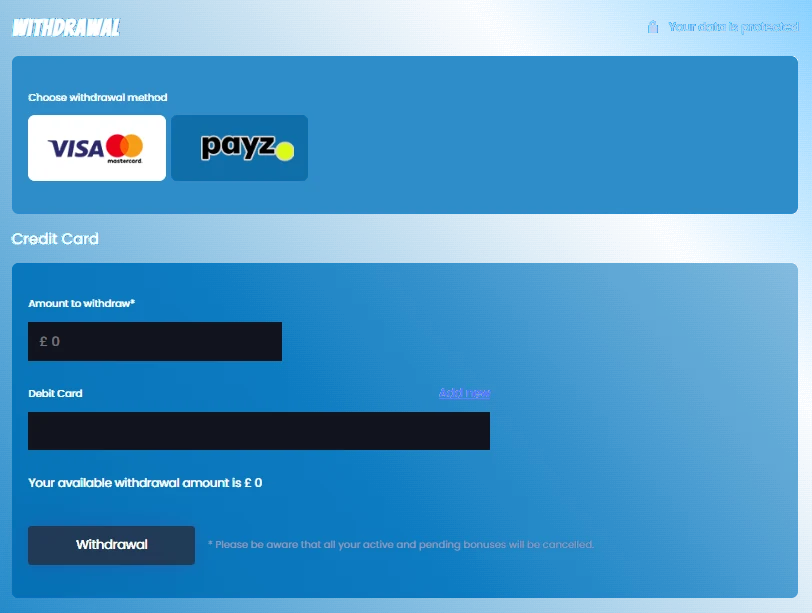
Withdrawal Methods
| Method | Processing Time | Payment Identification |
|---|---|---|
| Debit Cards | 3 to 7 business days | Babaloo Limited / ProgressPlay Ltd |
| PayPal | 3 to 7 business days | Babaloo Limited / ProgressPlay Ltd |
| Skrill | 1 business day | Babaloo Limited / ProgressPlay Ltd |
| Payz | 3 business days | Babaloo Limited / ProgressPlay Ltd |
| NETELLER | 1 business day | Babaloo Limited / ProgressPlay Ltd |
| Apple Pay | 3 business days | Babaloo Limited / ProgressPlay Ltd |
| PaySafeCard | 3 business days | Babaloo Limited / ProgressPlay Ltd |
| Instant Bank Payment | 1 business day | Truelayer Limited / ProgressPlay Ltd |
Withdrawal Fees and Limitations
Withdrawals are subject to a processing fee of 1% up to GBP 3 per withdrawal.
Some card withdrawals may not be available because of issuer or country restrictions. The source information states that Visa credit and debit card withdrawals are unavailable in certain countries due to local issuer restrictions, and Mastercard credit and debit card withdrawals are unavailable due to issuer restrictions.
Babaloo Limited may delay or stop cash-out processing until final approval has been received for outstanding deposit transactions.
Payment Verification
Casimpo Casino may request verification before processing deposits or withdrawals. This can include proof of identity, proof of address, payment method screenshots, card images with sensitive digits covered, bank statements, e-wallet profile pages or source of funds documents.
For security, never send passwords, PIN codes, full card numbers, CVV codes or online banking credentials.
Payment Security
Casimpo Casino uses encryption and payment security controls to help protect financial information. Card cashier transactions are processed according to Payment Card Industry security standards.
If you notice an unfamiliar payment descriptor, remember that transactions may appear under payment processor names connected with Casimpo Casino.
Who Is Babaloo Limited?
Babaloo Limited provides transaction processing services for Casimpo Casino. Deposits or withdrawals may appear on payment statements under names such as:
- ProgressPlay Limited
- Babaloo Limited
- Babaloo CASHOO
These names may sometimes appear with a city name because Babaloo Limited uses different banking gateways.